So, another JPA tutorial. What makes this one different? Well, for one thing, this one comes with a working, downloadable project that works with Eclipse, NetBeans, and IntelliJ IDEA 7. It’s packaged with Hibernate, Toplink, and OpenJPA. And it’s been tested with MySQL, PostgreSQL, MS SQL Server, and Sybase. In other words, it works with 36 different IDE/JPA Provider/Database combinations!
Another thing that makes this tutorial different is the subject matter: Pizza! Who doesn’t love pizza? Except lactose intolerant people. And people who can’t eat gluten. But other than them, who doesn’t love pizza? So we’re going to create a simple database model for a pizza shop’s point-of-sale system.
The
Schema
Unsurprisingly, the starting point for any ORM task is
usually the database schema (there are people who start
with the Objects and work “backward” to the schema, but
I haven’t worked with any of them yet). In our example,
we have a pristine, consistent, completely normalized
schema. In other words, it’s probably nothing like
you’ll ever be lucky enough to see in the real world!
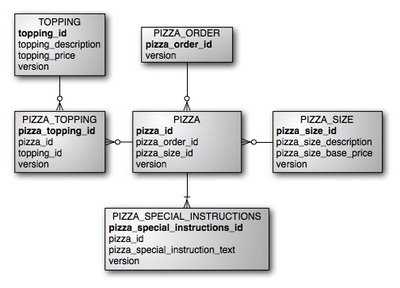
Here’s our simple little ERD:
 From
this ERD, we can infer the following: 1.) An order is
comprised of zero or more pizzas. 2.) A pizza is
associated with one size. 3.) A pizza may be associated
with a string of text containing “special instructions.”
4.) A pizza may have zero or more toppings. You probably
also notice that each table has a column called version.
This will be used for an optimistic
locking strategy.
From
this ERD, we can infer the following: 1.) An order is
comprised of zero or more pizzas. 2.) A pizza is
associated with one size. 3.) A pizza may be associated
with a string of text containing “special instructions.”
4.) A pizza may have zero or more toppings. You probably
also notice that each table has a column called version.
This will be used for an optimistic
locking strategy.
The first question is, “Where should we start?” There’s no right answer for this, but I find that it’s easiest to start working with the entities with the fewest dependencies. For example, you can’t have an order without a pizza, and you can’t have a pizza without a size, so maybe it makes sense to start with the size. But before that, we’ll want an ID interface.
An ID
Interface
First things first. You’ll notice that, in our schema,
every table has an integer ID. It’s often a good idea to
have all of your objects implement the same interface
for accessing the ID, because it makes it easier to
create Generic DAOs (more about that in a future post).
For now, let’s make a really simple interface like
this:
public interface IdObject {
  public void setId(Integer id);
  public Integer getId();
}
Many-to-One
Unidirectional Relationships
Now that we’ve gotten that out of the way, let’s create
the Size class. It’s a simple POJO littered with
annotations, like this:
@Entity
@Table(name="PIZZA_SIZE")
public class Size implements IdObject {
  @Id
  @Column(name="pizza_size_id")
  private Integer id;

  @Column(name="pizza_size_description")
  private String description;

  @Column(name="pizza_size_base_price")
  private BigDecimal basePrice;

  @Version @Column(name="version")
  private Integer version;

  public Integer getId() { return id; }
  public void setId(Integer id) { this.id = id; }

  public String getDescription() { return description; }
  public void setDescription(String description) { this.description = description; }

  public BigDecimal getBasePrice() { return basePrice; }
  public void setBasePrice(BigDecimal basePrice) { this.basePrice = basePrice; }

  public Integer getVersion() { return version; }
  public void setVersion(Integer version) { this.version = version; }
}
Here are some notes on the annotations that were used
in the above class:
@Entity tells the JPA
provider that this is a managed object.
@Table specifies the
table name. The JPA provider will attempt to default the
table name to a sane value based on the class name, but
I like to be explicit. I’m funny that way. Perhaps it’s
OCD.
Or a power-trip.
@Column indicates the
name of the column, and can include other attributes
about the column (you’ll see a few additional attributes
later on). Again, JPA can try to default this to sane
values for you, but I like to be explicit.
@Version indicates
that a particular column is used for indicating when a
row is updated. This column can then be used in an optimistic
locking scheme.
Next, let’s do the Pizza object to show how we map a Pizza to a Size.
One thing I that always tripped me up when I started
out with ORM
tools was the difference between “One-to-Many” and
“Many-to-One.” I never knew, if I call a relationship
many-to-one in my metadata, is this object the one
that there are many of, or is it the other way around?
The answer is that “this” object always comes first.
ManyToOne means that “there are many of
this object to
one of those
objects.” The “Many” side is often the side that has the
foreign key.
In our case, there will be many Pizzas that are the same size. So when we make our Pizza object, we will want to use the @ManyToOne annotation. Here’s what the Pizza object looks like so far. I’ve omitted the getters and setters to save space:
@Entity
@Table(name="PIZZA")
public class Pizza implements IdObject {
  @Id
  @Column(name="pizza_id")
  private Integer id;

  @ManyToOne(cascade={CascadeType.ALL})
  @JoinColumn(name="pizza_size_id",nullable=false)
  private Size size;

  @Version @Column(name="version")
  private Integer version;

  // (Accessor methods omitted)
}
Note that, when we made our Size object, we did not include a reference to the Pizza. That was an intentional design decision. In this application, it’s unlikely that we will want to instantiate a Size object, and get a collection containing all of the Pizzas of that size, so we don’t bother with mapping it. This is called unidirectional association.
The @ManyToOne annotation specifies a cascade attribute. There are several different settings for this attribute, which you can read more about here. I tend to cascade the persistent state to all related objects because it reduces the amount of redundant API calls. By default, JPA does not cascade pers istence to related objects. I’ll cover the cascade attribute in future posts, but for now, we’ll go with my personal preference, because I’m writing the article!
The @JoinColumn annotation indicates the column name that defines the linkage between the Pizza and the Size. You’ll also note that we’ve included some additional attributes on our @Column and @JoinColumn annotations. The unique and nullable attributes are particularly useful if you use tools to generate schema DDL from your mappings.
One-to-Many bidirectional
relationships
Both the SpecialInstruction and the Order objects are
examples of One-to-Many bidirectional relationships. In
the case of SpecialInstruction, it is likely that we
will care about which Pizza an instruction is associated
with, and likewise for the Order. A bidirectional
one-to-many relationship implies that one object has a
collection of
other o bjects. For example, an Order has a collection
of Pizzas. First, lets add an order attribute to our
Pizza object:
@Entity
@Table(name="PIZZA")
public class Pizza implements IdObject {
.
.
  @ManyToOne(cascade={CascadeType.ALL})
  @JoinColumn(name="pizza_order_id",nullable=false)
  private Order order;

  public Order getOrder() { return order; }
  public void setOrder(Order order) { this.order = order; }
.
.
}
Next, let’s create an Order object to contain our collection of Pizzas, like this:
@Entity
@Table(name="PIZZA_ORDER")
public class Order implements IdObject {
  @Id
  @Column(name="pizza_order_id")
  private Integer id;

  @OneToMany(cascade={CascadeType.ALL},mappedBy="order")
  private Set pizzas = new HashSet();

  @Version @Column(name="version")
  private Integer version;

  // (version and id accessors omitted)

  public Set getPizzas() {  return pizzas; }
  public void setPizzas(Set pizzas) { this.pizzas = pizzas; }
  public void addPizza(Pizza pizza) {  pizza.setOrder(this);  this.pizzas.add(pizza); }
}
There are a couple of things you worth noting about
this mapping:
1.) The @OneToMany
annotation uses the mappedBy attribute to
indicate which member of the related object defines the
linkage between the two tables. In this case, we are
saying that the Pizza object contains a member named
order, which defines the linkage between the two
objects.
2.) I’ve created a utility method called addPizza. This
simplifies setting both sides of the bidirectional
relationship by setting the Order object on the Pizza
and adding the
Pizza to the Order’s collection. Users of this class
will only need to make one method call to do both.
Many-to-Many relationships via a Join
Table
The last thing we’ll cover is how to map Join Tables. In
our ERD, you can see that Toppings are modeled in the
database with a TOPPING table that contains all of the
valid toppings, a PIZZA table that contains all of the
valid Pizzas, and a PIZZA_TOPPING table in the middle
that maps all of the valid Pizzas to all of the valid
Toppings. You could create an
object called PizzaTopping that corresponds to the
PIZZA_TOPPING table. Then you could have a One-to-Many
relationship from the Pizza to the PizzaTopping, and a
One-to-One from each PizzaTopping to a Topping. That
would be very cumbersome to work with! Fortunately,
there’s a better way.
Logically, a Pizza has a collection of Toppings. In our Java code, we really shouldn’t care about the fact that there is a PIZZA_TOPPING join table in the middle. First, let’s create a simple Topping class:
@Entity
@Table(name="TOPPING")
public class Topping implements IdObject {
  @Id
  @Column(name="topping_id")
  private Integer id;

  @Column(name="topping_description")
  private String description;

  @Column(name="topping_price")
  private BigDecimal price;

  @Version @Column(name="version")
  private Integer version;

  // (Accessors omitted)
}
This is how the association would be mapped in the Pizza class:
@Entity
@Table(name="PIZZA")
public class Pizza implements IdObject {
.
.
  @ManyToMany(cascade={CascadeType.ALL})
  @JoinTable(name="PIZZA_TOPPING",
             joinColumns=@JoinColumn(name="pizza_id"),
             inverseJoinColumns=@JoinColumn(name="topping_id"))
  private Set toppings = new HashSet();

  public Set getToppings() { return toppings; }
  public void setToppings(Set toppings) { this.toppings = toppings; }
  public void addTopping(Topping topping) { this.toppings.add(topping); }
.
.
}
The @JoinTable annotation
defines three key attributes:
name: Identifies
the name of the join table.
joinColumns:
This attribute identifies the column name in the join
table that points to this object.
inverseJoinColumns:
This attribute defines the column name in the join table
that points to the
other objects.
From your Java code, the semantics for dealing with toppings on a pizza are just like any other set, much like you’d work with a One-to-many object.
Conclusion
Since the introduction of annotations, object/relational
mapping is one of the easiest aspects of working with
JPA over other frameworks. You can see this whole
project in action on your IDE of choice by downloading
it here
(or from here
if that doesn’t work for some reason). It should be a
pretty reasonable starting point if you want a reference
project to start playing with JPA. I hope to revisit the
Pizza Shop project to cover other JPA topics in future
posts.